AION 1 or AION 2 controls?
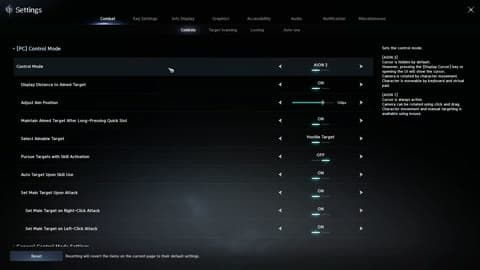
Open Settings → Combat → Controls. AION 2 mode uses mouse movement for the camera and hides the cursor; hold Alt to access interface buttons. AION 1 mode provides the traditional cursor and target-based controls. Use AION 2 for direct camera aiming, or AION 1 when you want a persistent cursor for selecting targets and party frames.
Targeting and movement: starting values
| Menu | Setting | Starting value and purpose |
|---|---|---|
| Combat → Target Scanning | Preferred Search Direction | Front of Camera: scan toward the fight instead of selecting an enemy behind you |
| Combat → Controls | Pursue Targets with Skill Activation | Off for ranged combat and positioning-sensitive bosses; On for melee mob farming |
| Combat → Controls | Auto Target upon Skill Use | On for ordinary PvE; Off for deliberate PvP target selection |
| Combat → Controls | Skill Queue | On: queue the next skill during the current animation |
| Combat → Movement | Interact after Auto Move | On: interact on arrival at a quest NPC or object |
| Combat → Movement | Auto Sprint | On for quest travel |
Combat controls including target pursuit and automatic targeting.
Potion thresholds and automatic buffs
Combat → Auto Use: start HP potion auto-use at 70% while learning encounters. For low-risk farming, 40–50% saves potions but leaves less room for burst damage. These are starting recommendations, not different potion effects. Set Buff Auto Use Conditions → In Combat so scrolls and buffs are not consumed while standing in town. Keep a manual potion button accessible. In Combat → Looting, configure collection rules separately from equipment extraction; extraction consumes the selected item.
Buttons to keep outside your macro
Bind dodge/block, interrupt, potion, healing and cleanse directly. Put repeatable damage skills in the built-in macro. In HUD Edit, place HP/MP near your skill bar and keep party frames visible for healing. Info Display → Common controls nameplates; hiding your own nameplate reduces central clutter, but retain the HUD health bar.
Crowded-fight graphics preset
| Option | Starting value | Result |
|---|---|---|
| Identical Player Appearance | On | Simplifies other characters' cosmetic models |
| Other Players' Effects | Self / Party | Reduces effects covering enemy warnings |
| Shadows | Low | Reduces shadow detail and rendering load |
| Reflections | Low | Reduces reflection detail and rendering load |
| Upscaling | Supported DLSS / FSR option | Trades native rendering for upscaling; availability depends on GPU |
Keep encounter warnings visible. Lower reflections and shadows before hiding information needed to dodge.
Fix three common control problems
Running into enemies when casting: disable Pursue Targets with Skill Activation. Selecting enemies behind you: use Front of Camera. Buffs disappearing during travel: change Buff Auto Use Conditions from Always to In Combat.